At one point a few weeks back (for one of the homeworks), I could not figure out how to delete the current element from the DOM while working in Javascript. Some searching turned up the following solution:
detaildiv.parentNode.removeChild(detaildiv);
Basically, you get the element’s parent node, then deleted the specified child node, this being the element. I’m not sure this the standard method, but it works and is clean. (This was before we were looking at JQuery, so perhaps it has a better solution.)
CS601 – Tablesorter
I’m a bit behind in blogging for class due to time constraints. I’m spending most of my free time working on my project. I have a bunch of ideas in the queue, but here’s one I just used tonight.
One aspect of the project requires a sortable table. Not easy to implement on my own, but I found the very nifty JQuery UI Tablesort plugin. This is pretty cool and pretty easy to implement. I’ll include some snippets from the page which shows the employees as list of all reservations.
Here is the JS code which creates the object:
<script type="text/javascript">
// add parser through the tablesorter addParser method
$.tablesorter.addParser({
// set a unique id
id: ‘restatus’,
is: function(s) {
// return false so this parser is not auto detected
return false;
},
format: function(s) {
// format your data for normalization
return s.toLowerCase().replace(/made/,0).replace(/arrived/,1).replace(/seated/,2);
},
// set type, either numeric or text
type: ‘numeric’
}); $(document).ready(function()
{
$(“#restable”)
.tablesorter();
}
);
</script>
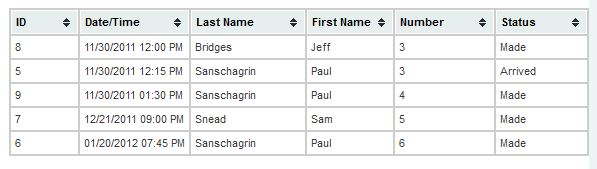
The first block is simply a function to allow me to sort the reservation status (e.g., has the party arrived, have they been seated) using an ordering index regardless of the text for the status. (E.g., I would want “Made” sorted before “Arrived”.)
The second block actually creates the applies the tablesorter object to the HTML table with the ID of restable. This table is a plain old HTML table with the addition of the class of tablesorter.
You can also download the themes from the site, put them in your CSS directory, and then include that in your header. With all that you get the following (on load):

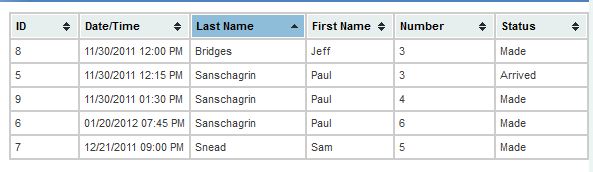
If you click the Last Name column:

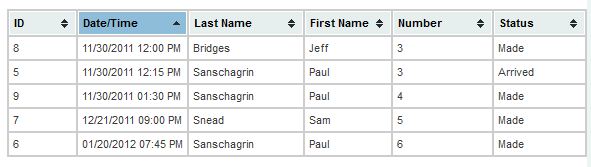
If you click the Date/Time column:

It does the date correctly automatically. (Verified as 11/30/2011 12:00 PM sorts before 11/30/2011 01:30 PM and before 01/20/2012 07:45 PM. If it was a simple text-based sort, this would not be the case as 0 comes before 1.)
It can also do multicolumn sort and a multitude of other things which I have not explored.
Even More Photos: Sep & Oct
I’m almost all caught up now. I just finished uploading photos from September & October. Included are photos from Kyle’s first day of kindergarten and a few from Halloween. Hopefully I’ll have the last few (from early November) up tomorrow.
More Photos: Jul & Aug (plus a bit of Sept)
I just finished posting the batch from July and August. This also includes photos from September from our trip to Vermont to have them all included in the same album.
New Kyle Photos
I know I have been very remiss in not posting recent photos of Kyle. (The most recent ones were posted in April.) I have finally managed to go through and tag/catalog all the ones I have (up to a couple of weeks back). I’ll be posting them over the next few days. Please keep in mind that in order to finally catch up, I decided to simply batch process all the images, so they may not be up to the usually standards. (Normally, I manually process each image, but that’s quite time consuming.) Anyway, the first batch is up at Kyle: May & June 2011. Here’s a couple of images:
Kyle on Halloween
As a surprise to us all, Kyle decided not to be a firefighter on Halloween this year. Instead he was a zookeeper. (He was a firefighter for the trick-or-treating on Sunday in downtown Westfield.) As another surprise, we ended up trick-or-treating with snow on the sidewalks in Westfield. Here are a couple of photos.


CS 601 – Firebug for Layout
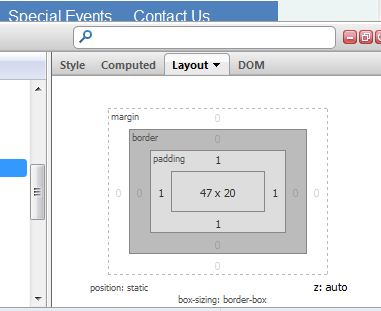
While working on my project site, I noticed the layout pane of Firebug:

I think this could be very useful for examining and adjusting margins and padding values.
CS 601 – Clearing Divs
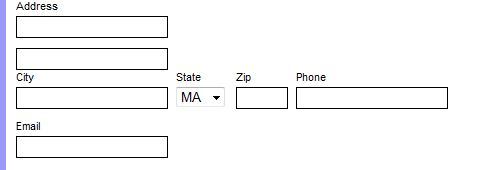
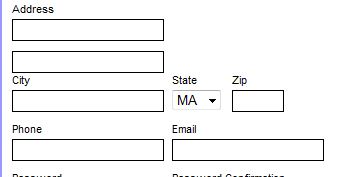
One of the issues that came up was where cases where divs floated (left, but I suppose it could happen to right floated ones as well) is that they are misaligned when they don’t fill the space. Below is an example of this from my registration form. What I want is to get fields in the form:
City State Zip Phone Email
Instead I get:

I fixed this to get the desired result:

How did I do this? I used a “clearing” div as follows:
<label for="zipcode"><span>Zip</span>
<input type="text" name="zipcode" />
</label>
<div class="clearing"></div> <=== Relevant Code
<label for="phone"><span>Phone</span>
<input type="text" name="phone" />
</label>
<label for="email"><span>Email</span>
<input type="text" name="email" />
</label>
(Note, I omitted the City and State as the State select input has a bunch of irrelevant PHP code.)
An here's the CSS:
.clearing {
clear: both;
}
Based on some quick reading, this is telling the browser to not allow floating elements on both sides, hence resetting the floats. I have to admit, I didn't realize this now. Instead, I have been using it extensively for float issues in the BU WordPress installation used for the Chemistry website. (It works even better now that they're not lost when someone edits a page with the visual editor instead of the HTML editor.)
Based on some additional reading, it seems like another way to do this is to put the objects in a containing div and then setting the width and overflow: auto . (See http://www.quirksmode.org/css/clearing.html.) I actually think the "old" way is better as you don't have to readjust the width of the container if the inner elements change and you don't have to have the extra CSS to set the width for each and every container. (Instead, I have one CSS selector for div.clearing.) Also, In my mind it's cleaner to have the single, self-contained div line in the HTML instead of the div wrapping a bunch of other code.
CS 601 – Scrollable Divs
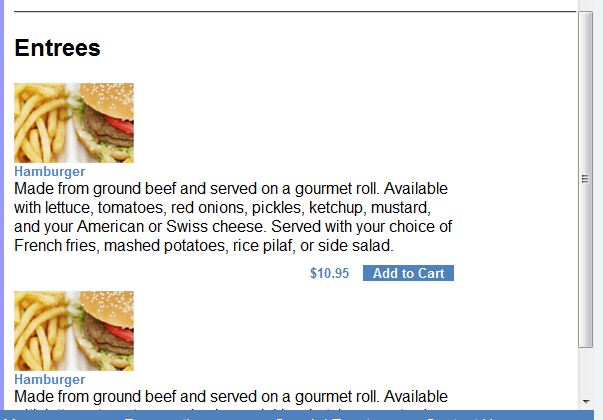
While doing my styling, I realized the menu is going to be much longer than the space I have allotted for it in the design. I used the technique listed at http://www.htmlite.com/faq015.php to make the menu div scrollable. Here’s the CSS:
.menu {
height: 700px; /* Same height as content div */
overflow: auto;
}
Here’s what it looks like:

I’m not sure I like what it looks like, and I may replace it with some nicer Javascript. For now, however, it works.
CS 601 – Different Footers Depending on State
One of the things I’m doing with the site is to have different footers depending on if a user is logged in. The footer will contain a second, static menu for accessibility reason. This would be pretty straightforward to do in PHP in the footer page except I have different numbers of items depending on if a customer is logged in, if an employee is logged in, or if no one is logged in. This means the div widths have to change to keep it centered in the footer menu wrapper div. I could do this in the page, but I thought it would get messy and cumbersome. Instead I use includes.
In index.php:
$loggedinCustomer = True; // Just here for styling testing. $loggedinEmployee = False; // Will be extracted from login cookie.
In footer.php:
if ($loggedinCustomer) {
include('footermenuCustomerLoggedIn.html');
} else if ($loggedinEmployee) {
include('footermenuEmployeeLoggedIn.html');
} else {
include('footermenuNotLoggedIn.html');
}
Each of the HTML pages is the html for just the menu and not a complete page (with head and body elements, etc.) The main.css file then contains selectors for different divs, etc., classes of NotLoggedIn, CustomerLoggedIn, and EmployeeLoggedIn. In fact, considering it, I could even import different CSS files depending on the login state, but that might be overkill for this.
This looks like an interesting solution. and I may use it for more than this. It also follows the model-view-controller (MVC) desing concept presented by Murach.
PS, coming soon will be the post about MySQL developer which I promised a couple of weeks back. I’m also going to do one on the Netbeans IDE. For the latter, suffice to say that if you’re not using it (or an equivalent IDE), get it.